JSONata in Pantarey
JSONata is the query and transformation language for JSON with which Pantarey shapes data in the process, calculates computed fields and evaluates validation rules. An expression reads from a JSON object and returns a new result: a field, an object, a list or a number. Fields are written without brackets (antrag_db.mitarbeiter), objects are written like JSON, functions start with $. The complete language description with all standard functions is on jsonata.org; Pantarey uses the library in version 2.2.2 in the process, in the Data Designer and in the browser. This page describes what Pantarey adds: the variables, the Pantarey functions, the most common patterns, the behaviour on errors and the ways to test.
Where JSONata applies
JSONata applies wherever the whole field is an expression: input and output expression of every activity, input of the start event, input and output of the database element, the JSONata fields of the service tasks (email recipients, attachments, HTML data input, PDF data, grayscale input), the form of a user task, computed fields and validation rules with language JSONata, the expression of the record view widget and the conditions of the planning board. Text fields such as subject, business label or file name take $(…) placeholders instead. The complete mapping is under Which language where?.
Variables
| Variable | Meaning | Where |
|---|---|---|
$ |
the current object: in the process the message (input) or the raw result of the activity (output); in the Data Designer the record or, inside a list, the current row | everywhere |
$$ |
the root of the input, also inside lists and functions | everywhere |
$root |
the whole record, even when $ is currently a list row |
computed fields and validation rules only |
$old |
the saved previous state of the record, null on creation |
computed fields only |
$$context |
details of the last step, written into the message by Pantarey | message in the process |
In the process $root and $old are not set. A computed field inside a list accesses the record with $root.kunde, while menge * preis refers to the row, see Computed fields.
$$context
After every step Pantarey adds the object $$context to the message. Because the name starts with $$, it is addressed in JSONata with backticks: `$$context`.executedBy. In placeholders $($$context.executedBy) is enough. Which fields it contains depends on the step:
| Source | Fields in $$context |
|---|---|
| User start (form) | activityType: "StartEvent", eventDefinition: "UserStartDefinitionType", executedBy (email), executedAt (ISO timestamp), selectedAction (when the start button carries an action) |
| Start via AI assistant (MCP) | as user start, plus startedVia: "mcp", mcpClient |
| Start via file upload | as user start, plus fileUpload: true; the message contains uploadedFile or uploadedFiles |
| Record trigger (Running timers widget) | as user start |
| Schedule (timer start) | activityType: "StartEvent", eventDefinition: "TimerEventDefinition", nothing else |
| User task completed | activityType: "bpmn:UserTask", finishedAt (milliseconds), executedBy, executedAt, selectedAction (only when an action button was pressed) |
| User task completed via AI assistant | plus completedVia: "mcp", mcpClient |
| User task after time limit, behaviour "continue" | timedOut: true, completedBy: "timeout", activityType: "userTask" or "externalUserTask" |
| External task completed | activityType: "externalUserTask", completedAt, completedBy: "external"; the message also contains selectedAction and formData |
| External task asynchronous | activityType: "externalUserTask", executionMode: "async", completedAt, completedBy: "async-dispatch" |
| Process end | activityType: "bpmn:Process", finishedAt |
| Dry Run | executedBy: "dry-run@pantarey.io" |
The instance ID and the element ID are not in $$context. If a message containing $$context is written to a record, the object ends up as a field in the record; the input of the database element removes it with $sift($, function($v, $k) { $k != '$$context' }).
Pantarey functions
In addition to the JSONata standard library there is $fn('name', …) with functions for text, numbers, dates, working days, counters and ULIDs, for example $fn('date_toGermanDate', antrag_db.von) or $fn('nextId', 'rechnung'). The catalogue is under Template functions $fn. In JSONata the arguments reach the function as real values (a number stays a number), in placeholders as text.
Two restrictions: sql_list and sql_raw are not allowed in JSONata ("fn(): not allowed in jsonata"), they belong in SQL queries. And in the live calculation in the form (computed fields, validation rules in the browser) expressions containing $fn( are skipped; they are calculated on save.
The legacy forms $nextCounter('name'), $ulid(), $dateToPath(x) and $toGermanDate(x) remain valid and are redirected to $fn internally.
Ten basic patterns
All examples are evaluated against the stated input. The input stands for the message in the process "Urlaub beantragen" (request leave) or a material order of Musterfirma GmbH.
1. Read a field
Input:
{ "antrag_db": { "mitarbeiter": "anna.funk@musterfirma.de", "von": "2026-07-13" } }
Expression: antrag_db.mitarbeiter
Result: "anna.funk@musterfirma.de"
$.antrag_db.mitarbeiter is the same. A path into a missing field gives no result, see Error behaviour.
2. Build an object
Input as above.
{
  "to": antrag_db.mitarbeiter,
  "subject": "Urlaub " & antrag_db.von
}
Result:
{ "to": "anna.funk@musterfirma.de", "subject": "Urlaub 2026-07-13" }
Keys are quoted, values are expressions. This is how the input for a service task is built.
3. Keep or remove fields
Input:
{ "antrag_db": { "von": "2026-07-13", "bis": "2026-07-17", "status": "offen", "$$context": { "executedBy": "anna.funk@musterfirma.de" } } }
Remove with $sift: $sift(antrag_db, function($v, $k) { $k != '$$context' })
Result: { "von": "2026-07-13", "bis": "2026-07-17", "status": "offen" }
Add or overwrite with $merge: $merge([antrag_db, { "status": "genehmigt" }])
Result: { "von": "2026-07-13", "bis": "2026-07-17", "status": "genehmigt", "$$context": { … } }
The second object wins for equal keys. Both together write a cleaned record with a new status.
4. Filter a list
Input:
{ "positionen": [
  { "artikel": "Monitor 27 Zoll", "menge": 2, "preis": 249 },
  { "artikel": "USB-C-Dock", "menge": 1, "preis": 129 }
] }
Expression: positionen[menge > 1]
Result: { "artikel": "Monitor 27 Zoll", "menge": 2, "preis": 249 }
A single match comes back as a single object, not as a list. To always get a list, append []: positionen[menge > 1][] gives [ { "artikel": "Monitor 27 Zoll", … } ].
5. Sum
Input as in pattern 4.
Expression: $sum(positionen.(menge * preis))
Result: 627
positionen.(menge * preis) calculates per row, $sum adds up. Likewise $max, $min, $average.
6. Condition
Input:
{ "antrag_db": { "status": "genehmigt" }, "entscheidung": { "genehmigt": false } }
Expression: antrag_db.status = "genehmigt" ? "Zusage" : "Absage"
Result: "Zusage"
Guard against missing fields with $exists: $exists(entscheidung.begruendung) ? entscheidung.begruendung : "ohne Begründung" gives "ohne Begründung". Comparison is =, not ==; not equal is !=.
7. Strings
Input:
{ "rechnung": { "nummer": 1024, "datum": "2026-11-11" } }
Expression: "Rechnung " & rechnung.nummer & " vom " & $fn('date_toGermanDate', rechnung.datum)
Result: "Rechnung 1024 vom 11.11.2026"
& concatenates and converts numbers to text on the way. $string(1024) converts explicitly; $uppercase, $substring, $replace, $split and $join are further standard functions.
8. Dates
Input:
{ "antrag_db": { "von": "2026-07-13" } }
{
  "heute": $substring($now(), 0, 10),
  "in_einer_woche": $fromMillis($toMillis(antrag_db.von) + 7 * 86400000, '[Y0001]-[M01]-[D01]'),
  "deutsch": $fn('date_toGermanDate', antrag_db.von)
}
Result on 11 November 2026:
{ "heute": "2026-11-11", "in_einer_woche": "2026-07-20", "deutsch": "13.07.2026" }
$now() returns the ISO timestamp in UTC. Working days are counted by $fn('date_workdays', von, bis) with the account's work calendar.
9. Count
Input as in pattern 4.
Expression: { "anzahl": $count(positionen), "gross": $count(positionen[menge > 1]), "leer": $count(nicht_da) }
Result: { "anzahl": 2, "gross": 1, "leer": 0 }
$count on a missing field gives 0, not an error. That makes it suitable for conditions such as $count(positionen) > 0.
10. Pass files on
Input:
{ "rechnung": { "nummer": 1024 }, "rechnung_pdf": { "referenceId": "01HX7Z8K79G5T0ZJWBJ6C3V8PF", "filename": "document.pdf", "contentType": "application/pdf" } }
{
  "referenceId": rechnung_pdf.referenceId,
  "filename": "Rechnung_" & rechnung.nummer & ".pdf",
  "contentType": rechnung_pdf.contentType
}
Result:
{ "referenceId": "01HX7Z8K79G5T0ZJWBJ6C3V8PF", "filename": "Rechnung_1024.pdf", "contentType": "application/pdf" }
In the message a file is a reference with referenceId, filename and contentType, images additionally with thumbnail. JSONata treats it like any object; the reference can be passed on unchanged (rechnung_pdf) or, as here, rebuilt with a new name. Email attachments drop anything without referenceId.
Error behaviour
An empty field means: no transformation, the data passes on unchanged. If an expression gives no result (undefined in JSONata, for example a path into a missing field or a filter without a match), Pantarey reports:
Der Ausdruck liefert kein Ergebnis. Häufige Ursachen: das referenzierte Feld fehlt im aktuellen Datensatz, Tippfehler im Feldpfad (Groß-/Kleinschreibung beachten) oder ein Filter liefert keinen Treffer. Ausdruck: '…'. Verfügbare Felder im Datensatz: …
null, by contrast, is a valid result. What happens next depends on the place:
| Place | Consequence |
|---|---|
| Input expression | The step fails with "Transformation (Input-Parameter) für Aktivität '…' fehlgeschlagen". Pantarey stores a resume point with the message before the transformation; in the Process Explorer the message can be adjusted and the instance continued from this activity. |
| Output expression | The step fails with RESULT_PARAMETER_ERROR, also with a resume point and a proposal to continue. At the end event the instance has failed. |
| Validation rule (JSONata) | An evaluation error, including "no result", makes the save fail ("Validation rule … failed to evaluate"). In the live check in the form an expression without a result is skipped. Therefore guard fields with $exists, see Validation rules. |
| Computed field (JSONata) | The save fails with "Computed field … failed". A result of null removes the field from the record. |
| Email: recipients, sender, reply to | If JSONata fails and the text looks like an address, the text is taken literally; otherwise the step fails. Attachments and HTML data input always fail. |
| Gateway | If no condition matches and there is no default path, the step fails with XOR_GATEWAY_ERROR and a list of all conditions and their results. |
Security: access to JavaScript internals ($.constructor, __proto__) returns no object; the library is therefore pinned to 2.2.2.
Limits
- Input and result of the start event may not exceed 50 KB of text each; otherwise the validation blocks the deploy. Large messages later in the process are not a problem, Pantarey offloads them automatically.
- A process step has 360 seconds; a gateway condition 15 seconds. A JSONata expression that calculates longer makes the step fail. Computation-heavy processing belongs in a service task.
- For loops: from 200 KB of list data Pantarey switches to distributed mode; the limits for iterations are under Loops.
Testing
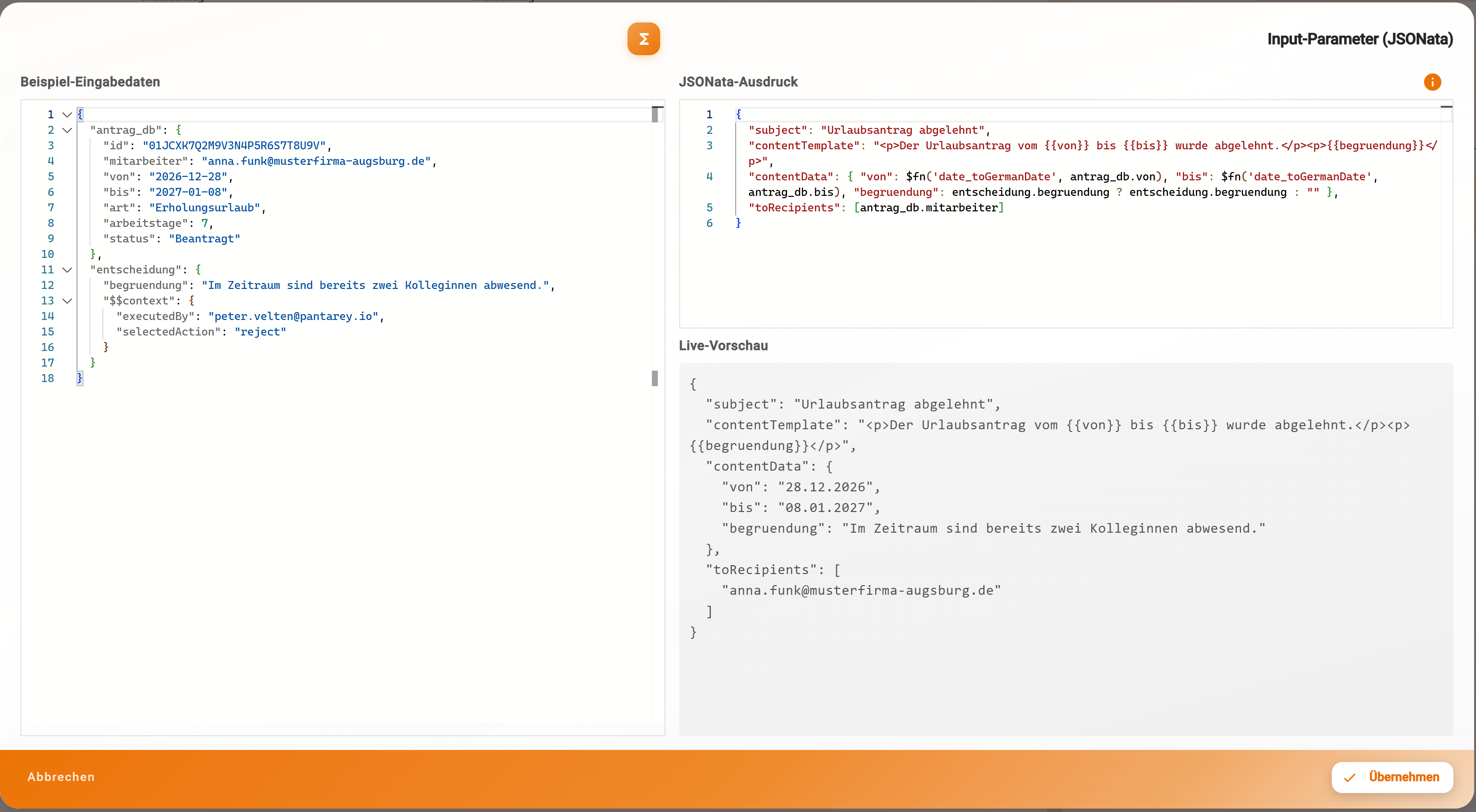
Live preview in the JSONata editor. In the dialog Configure data & variables the button with the code icon (tooltip JSONata editor) next to the input or output field opens the editor; in the settings dialogs of the service tasks (PDF data mapping, email fields) the button is called Open advanced editor with live preview. The dialog Input parameter (JSONata) (or output) shows the Sample input data on the left as editable JSON, the JSONata expression on the right and below it the Live preview, which recalculates after every change. The sample data is prefilled with a fixed example (auftrag, kunde, positionen) and is replaced with the own message, for example from ⋮ → Message schema or from Activities → In/Out of an instance; only for the PDF data mapping does it come from the PDF sample data. Invalid JSON reports "Beispieldaten konnten nicht in gültiges JSON konvertiert werden." Apply writes the expression into the field, Cancel discards it.
The preview calculates in the browser and replaces backend functions with stand-ins: $fn functions except sql_* are available, sys_ulid always returns the same value, counters only count up in the browser and consume no number, working days know only the nationwide public holidays. {{value:…}} is inserted before evaluation. There is no editor for file name and business label, because placeholders apply there.
Dry Run. The Dry Run in the Process Designer plays the process through with a start message generated from the data schema of the start form and checks input, output, result path, business label, display text and assignment of every element. Counters are only read. The Dry Run recognises gateway conditions only as a literal true or false; everything else takes the default path.
AI assistant. With the Build role the AI assistant has the tool test_jsonata: expression (up to 8000 characters), sample data and optionally root and old. An expression without a result comes back as a warning, a syntax error with position and token. All examples on this page were checked this way.
Example
"Absage senden" (send rejection) in the process "Urlaub beantragen" of Musterfirma GmbH has the input expression
{ "subject": "Urlaubsantrag abgelehnt", "contentTemplate": "<p>Der Urlaubsantrag vom {{von}} bis {{bis}} wurde abgelehnt.</p>", "contentData": { "von": $fn('date_toGermanDate', antrag_db.von), "bis": $fn('date_toGermanDate', antrag_db.bis) }, "toRecipients": [antrag_db.mitarbeiter] }. In the JSONata editor,antrag_dbandentscheidungfrom the message schema are on the left, and the live preview on the right shows"von": "13.07.2026"and the recipient list. Ifantrag_db.bisis missing from the sample data, the preview reports "Der Ausdruck liefert kein Ergebnis" and names the fields that exist.
Frequently asked questions
Why does my expression give \"no result\"?
Usually a path points to a field that does not exist in this message: typo, upper/lower case, or the result of an earlier step sits under a different result path. The message names the fields that exist; ⋮ → Message schema shows the names per step. Guard optional fields with $exists(feld) ? feld : "".
My field is called \"Rechnungs-Nr: intern\". How do I address it?
Names with colon, space, hyphen or a leading $ go in backticks: `Rechnungs-Nr: intern` or `$$context`.executedBy.
Why do I get an object instead of a list with one element?
JSONata returns a list with exactly one match as a single object. positionen[menge > 1][] forces a list; $count(…) counts correctly in both cases.
Number or text: why does betrag + 1 fail?
Form fields of type text deliver "19.99" as a string; + requires numbers ("The left side of the + operator must evaluate to a number"). $number(betrag) + 1 calculates, $string(1024) converts to text the other way, $type(feld) shows the type.
Next step
Template functions
$fn: the catalogue of Pantarey functions for text, numbers, dates, counters and SQL.