Reset account
Reset account is the maintenance page for test and demo accounts: it empties an account completely or in parts – processes, dashboards, users, data model or records – and, if needed, rebuilds the query tables and the search index. The page is deliberately hidden and only reachable for administrators: in the Users area, ?showReset is appended to the address in the browser, for example https://<account>.pantarey.io/administration?showReset. The sidebar then shows the Maintenance group with the entry Reset account.
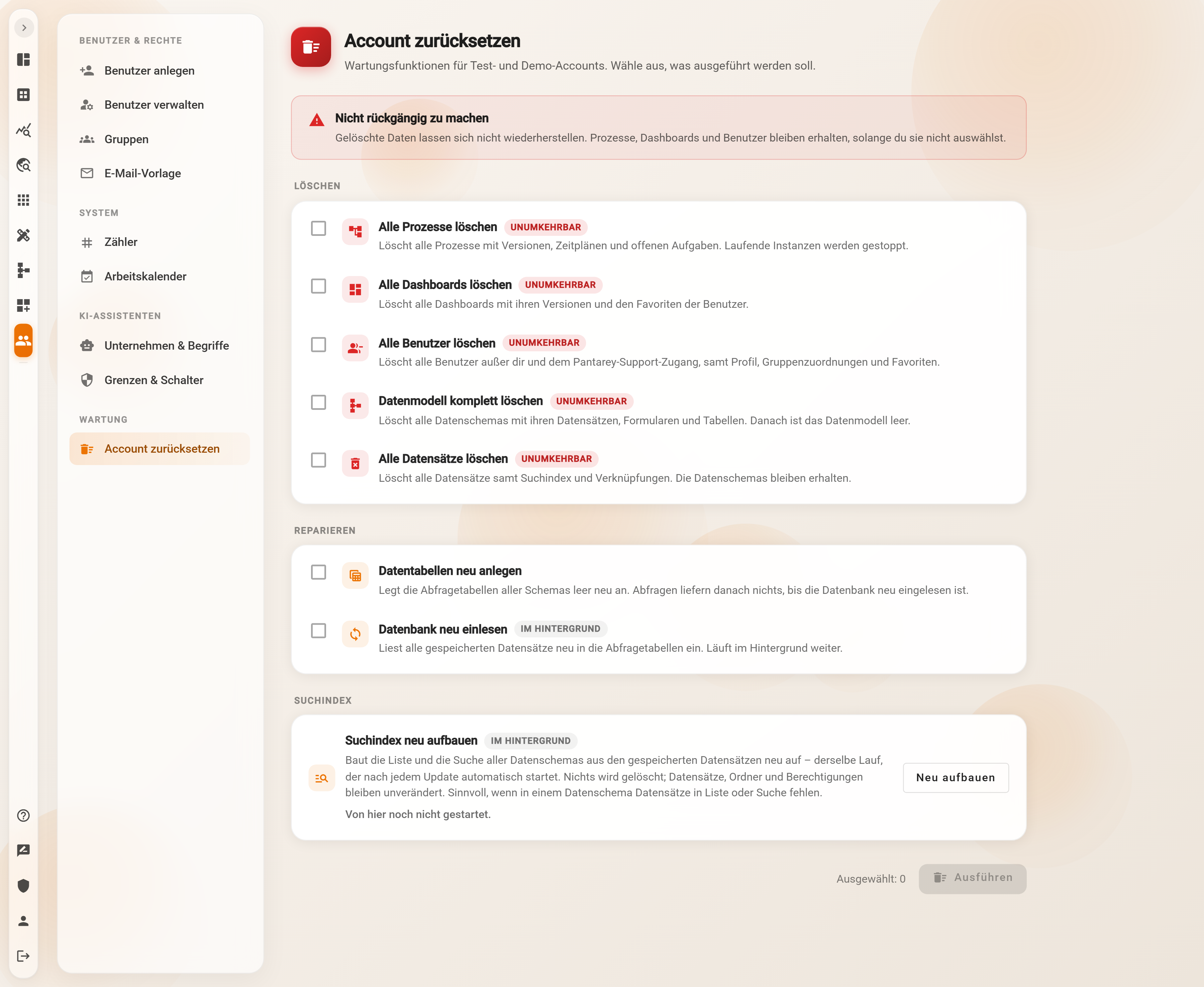
At the top the page explains that these are maintenance functions for test and demo accounts and asks what should be executed. Below it the notice box Cannot be undone states that deleted data cannot be restored and that processes, dashboards and users are kept unless they are selected.
Export first
No backup is created when resetting. Anything still needed should be saved beforehand as a ZIP archive under Account → Data Export.
Delete
Five options, each with the chip Irreversible. They can be ticked individually or combined.
| Option | What happens |
|---|---|
| Delete all processes | Deletes all processes with versions, schedules and open tasks. Running instances are stopped. |
| Delete all dashboards | Deletes all dashboards with their versions and the users' favourites. The associated menus are removed as well. |
| Delete all users | Deletes all users except the executing administrator and the Pantarey support account, including profile, group assignments and favourites. |
| Delete data model completely | Deletes all data schemas with their records, forms and tables. The data model is empty afterwards. Record permissions and sample data are gone as well. |
| Delete all records | Deletes all records including search index and links. The data schemas are kept. |
Repair
Two options for the query tables that data analytics and SQL-based dashboard widgets read from:
- Recreate data tables: recreates the query tables of all schemas empty. Queries return nothing until the database has been reloaded.
- Reload database (chip In background): reads all stored records into the query tables again. Continues in the background.
Usually both are ticked together. Reload database is started as the last step, after the other actions have finished, and then continues without the page.
Search index
Rebuild search index (chip In background) rebuilds the list and the search of all data schemas in the database from the stored records. It is the same run that starts automatically after every Pantarey update. Nothing is deleted; records, folders and permissions remain unchanged. The run makes sense when records are missing from the list or the search of a data schema.
The Rebuild button starts the run immediately, without selection and without confirmation; it reads "Running …" meanwhile. The status line below shows the state and refreshes every 15 seconds:
- not started from here yet
- running since <time> (started by <name>)
- finished at <time>: <n> data schemas, without errors – or with the list of data schemas where errors occurred
- the run from <time> was aborted
If a rebuild is already running, no second one is started.
What is kept
Regardless of the selection, the following remain:
- groups (memberships of deleted users are dropped)
- the email template for invitations
- the AI settings under Company & terms and Limits & switches
- counters and their values
- the work calendar
- secrets and values
- usage counters and usage limits under Account
If a counter should start at 1 again after the reset, it is deleted or set to 0 under Users → System → Sequences.
Execute
The footer counts Selected: n. Execute opens the Reset account dialog with the list Selected actions and the statement that these actions are executed now and deleted data cannot be restored. Only Execute permanently starts; Cancel closes the dialog without changes. During the run the button reads "Executing …"; at the end the page reports that the actions were executed.
Large accounts take longer than the browser waits. After about 30 seconds the message appears that the actions continue in the background and may take a few minutes – the deletions are nevertheless completed in full. If Reload database was ticked as well, the message may say that this step has not been started yet; it is then executed again on its own after a few minutes.
Example: Musterfirma GmbH
Musterfirma GmbH trains new employees in a dedicated demo account. After a workshop it contains dozens of test contacts, leave requests and three additional users. The administrator first starts an export under Account → Data Export, then opens …/administration?showReset, goes to Maintenance → Reset account and ticks Delete all records and Delete all users. Processes, dashboards and the data model remain for the next workshop. After Execute permanently the page reports that the actions were executed. Finally she sets the counter rechnungen to 0 under Users → System → Sequences so that the next training starts again with invoice number 1.
Frequently asked questions
The Maintenance group is missing from the sidebar.
It only appears when the address contains ?showReset, and only for users with the Administrator role. After clicking into another area of the app, the parameter has to be appended again.
Can a reset be undone?
No. There is no automatic backup and no recycle bin. A data export beforehand is advisable; loading it back through the interface is, however, not possible.
What happens to running instances?
With Delete all processes, running instances are stopped and open tasks are deleted. The other options leave processes and instances untouched.
Is the executing administrator deleted too?
No. Delete all users keeps the own account and the Pantarey support account.
What is the difference between Rebuild search index and Reload database?
The search index serves the list and the search in the database view. Reload database fills the query tables that data analytics and SQL widgets read from. If records are missing from the list, the search index helps; if queries return too little, the reload does.
After a short while the page reports that the actions continue in the background.
That is normal for larger accounts. The actions are completed in full; after a few minutes the database, the process designer and the user list show the new state.
Next step
Work calendar: define public holidays and days off per account – one of the settings a reset does not touch.