Email template
When a user is created, they receive an invitation email with the sign-in address and a temporary password. Subject and content of this email are set by an Administrator under Users → Email template; the page is titled Invite email template. The template applies to the whole account and only to the invitation: all other emails from Pantarey, including the one for Reset password, have fixed texts.
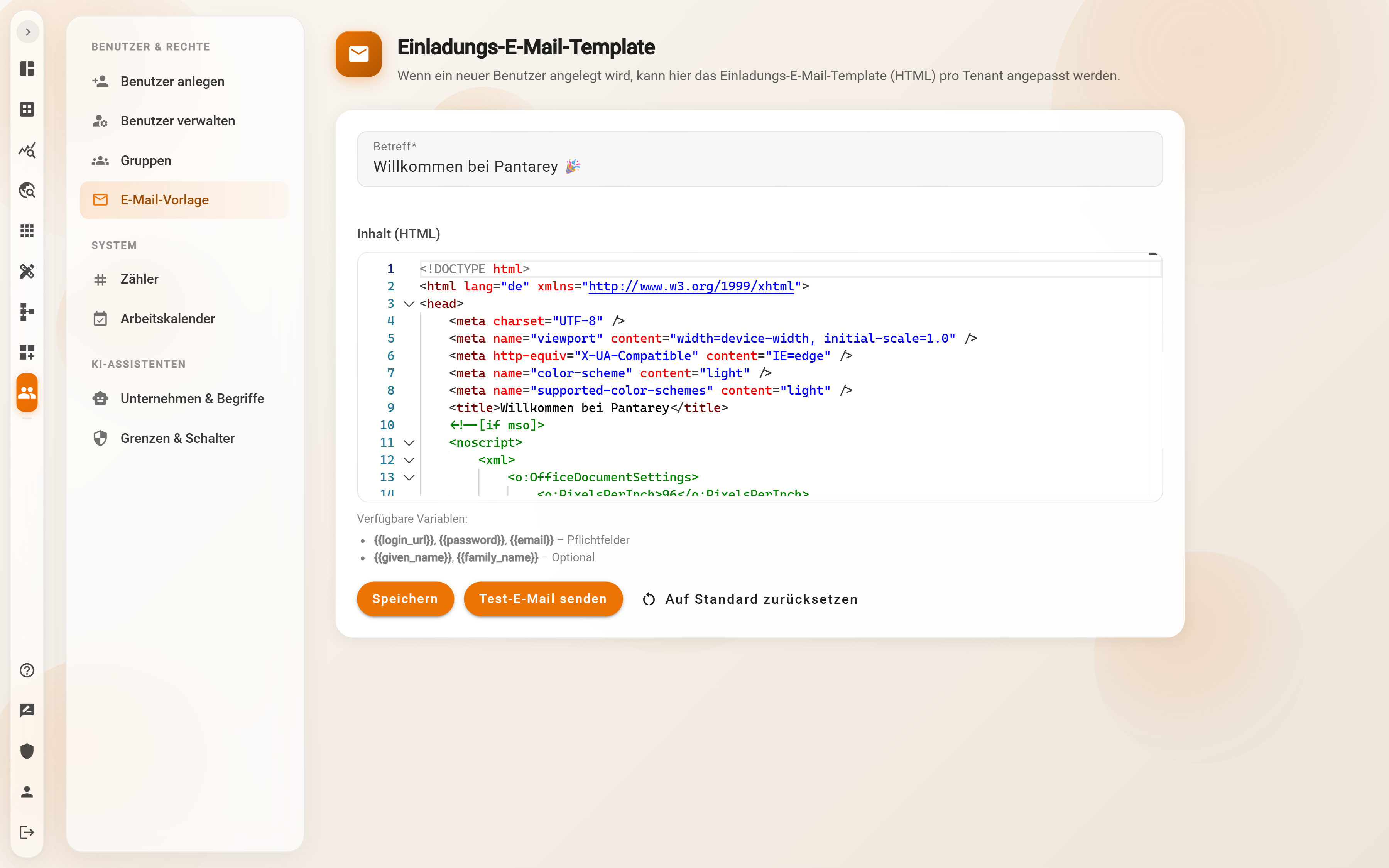
The fields
- Subject: required, one line. The default is "Willkommen bei Pantarey 🎉".
- Content (HTML): required, the text of the email as HTML in an editor with line numbers and highlighting. The default template is a complete HTML email with a logo bar, sign-in link and credentials; it can be adapted piece by piece or replaced entirely.
As soon as something is changed, the page shows the badge Not saved until Save is clicked.
Placeholders
Placeholders are written in double curly braces and are replaced with the new user's values when the email is sent:
| Placeholder | Value | |
|---|---|---|
{{login_url}} |
sign-in address of the account, https://<account>.pantarey.io |
required |
{{password}} |
the temporary password | required |
{{email}} |
email address of the new user, also their sign-in name | required |
{{given_name}} |
first name | optional |
{{family_name}} |
last name | optional |
If a required placeholder is missing, the template cannot be saved: "The following required fields are missing from the template: …". Without {{password}} the person would never get their password.
The buttons
- Save checks the required placeholders and applies subject and content: "Invite template saved successfully." The new template applies from the next invitation on; emails already sent do not change.
- Send test email sends the saved template to the email address of the signed-in administrator, with a sample name and sample password in place of the placeholders: "Test email has been sent." There is no preview on the page; the test is the way to see the result in Outlook, Gmail or on the smartphone.
- Reset to default discards the custom template immediately and without confirmation; afterwards the default template applies again: "Invite template has been reset to default." Whoever wants to keep a custom template copies the HTML content out beforehand.
Sender and scope
- The sender is always
willkommen@pantarey.io; it cannot be changed. Recipients should know the address so that the invitation does not end up in spam. - The template is used only for Create user. Reset password under Manage users sends an email with a fixed text, as do task notifications, error messages and the email for Forgotten password.
- The template is monolingual. The default template is German; for an English-speaking team the text in the template is translated.
Tips for a custom template
- Include the logo and company name so that the invitation is recognized as an internal email. Embed images as full
https://addresses, not as attachments. - Name a contact person with phone or email whom the person can turn to with questions about signing in.
- Place the sign-in link
{{login_url}}as a button or clearly visible link, and put the credentials{{email}}and{{password}}on a line of their own. - Mention that the temporary password is replaced by a personal one at the first sign-in and is valid for a limited time.
- After every change, Save and Send test email; HTML emails look different in Outlook than in the browser.
Example
Musterfirma GmbH, an IT service provider in Augsburg, puts its logo in the header, changes the subject to "Dein Zugang zu Pantarey bei der Musterfirma" and writes below the credentials: "Bei Fragen hilft die IT unter Durchwahl 120." The IT lead saves, sends himself the test email, checks it on the smartphone and then creates the new colleague. When a change goes wrong months later, Reset to default brings back the Pantarey template, and the logo is inserted again.
Frequently asked questions
The test email does not arrive.
It goes to the address of the signed-in administrator, not to a freely chosen one. Check the spam folder and allow the sender address willkommen@pantarey.io in the mail system. Once it arrives, invitations arrive too.
Can a sender name or reply address be set?
Not on this page; the sender is fixed as willkommen@pantarey.io. A contact person therefore belongs in the text of the template.
Does the template also apply to Reset password?
No. That email and all other system emails have fixed texts. The template affects only the invitation when a user is created.
Can one template per language be stored?
No, there is one template per account. Mixed teams write the text in two languages in the same template.
Next step
Counters: view, set and delete running numbers for invoices and orders.