Time, errors and signals
Besides tasks and gateways, a process needs three more things: the ability to wait, to deal with errors and to notify others. The intermediate and boundary events of the designer serve this purpose; everything they do not cover is handled by hand in the Process Explorer.
Waiting
The timer intermediate event (wrench at an intermediate event → Timer Intermediate Catch Event) pauses the instance. The only field is Wait time (seconds), also as a placeholder $(wartezeit); 86400 is one day. Typical: “reminder after three days”, by following the task with a timer and then an email, or a pause before the next call of an interface.
Time limits for tasks are set by the time limit of the user task and the external user task: after expiry either Cancel (error) or Continue with $$context.timedOut.
Errors
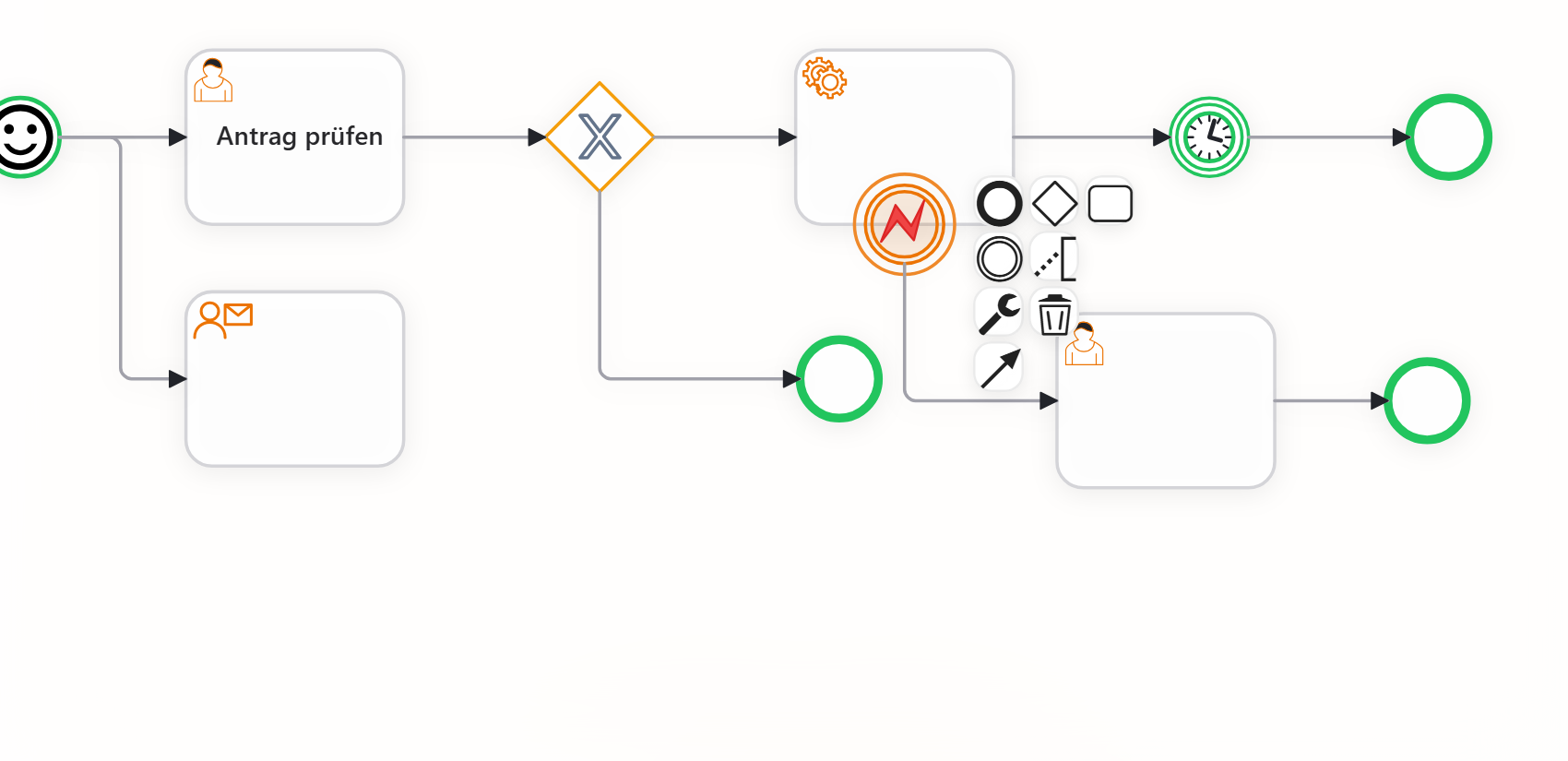
If a step fails, for example because a service cannot read a file or an expression returns no result, there are two ways:
- Without precautions, the instance is failed. The Process Explorer shows the step and the message; after a correction, it continues with Resume from last activity, Continue with next activity or Restart entire process. For rare errors, this is the simplest way.
- With an error boundary event: An intermediate event is dragged onto the border of the task and turned into an Error Boundary Event via the wrench. Every error of this task, including a time limit with Cancel (error) and a failed subprocess, leaves the task via this path; there are no error codes. The path behind it runs with the message as it was before the task; the error message itself is only shown in the Explorer (“Error (caught)”). Behind it follow, for example, a user task “Check error” or an email to support.
If an instance fails for good, the process owner (process properties) receives the email “Error in process ‹name›” with links to the Explorer and the designer, provided Errors in my processes is switched on in the profile, see Email notifications.
Service tasks retry temporary errors by themselves up to three times (timeout, briefly unreachable); not business errors. The HTTP request (REST) has its own fields retry and failOnStatus, see Predefined services. Errors in input and output expressions are described under Data in the process.
Signals
The signal intermediate event (Signal Intermediate Throw Event) sends signal name and signal data (JSON) to the user interface without pausing the instance. Recipients are the open dashboards that started this instance: the widget Start process and the planning board reload on a matching signal name, for example bestellungGespeichert directly after the Database step, so that the table next to it shows the new row. Receiving signals in the process is not possible; processes talk to each other via subprocesses, send tasks or webhooks.
Not available
The menus offer Timer Boundary Event and Error End Event; both currently have no effect. For “continue a task differently after x days”, use the time limit with Continue; for a different end, use a normal end event with its own business label.
Example
Invoice run of the Musterfirma: The service task “Create PDF from template” has an error boundary event that leads to the user task “Check invoice” for accounting. After sending, a timer waits 14 days; then a Database step reads the status, and a gateway decides whether a reminder is needed.
Frequently asked questions
An instance has been sitting in a user task for days.
Nobody has completed it; after the time limit (default 30 days), it fails or continues, depending on the setting. Before that, move it on in the Process Explorer with Continue with next activity or check the assignment.
Should every service get an error boundary event?
No. Only where a business-level handling makes sense. Everything else ends up as a failed instance in the Explorer and is fixed there.
Can a timer wait for a time of day?
The intermediate event only waits seconds. The seconds until a point in time are calculated by an expression in the input of a previous step, for example ($toMillis(faellig_am) - $toMillis($now())) / 1000.
Next step
Example: Request leave: all elements in one complete process.