Database
The Database in the left navigation is the place for individual records: looking up a customer, opening an invoice, correcting a leave request, creating an order without a process. What is stored here has been saved by forms, processes, imports or assistants, always according to the data schema defined in the Data Designer. Access is granted by the role View database.
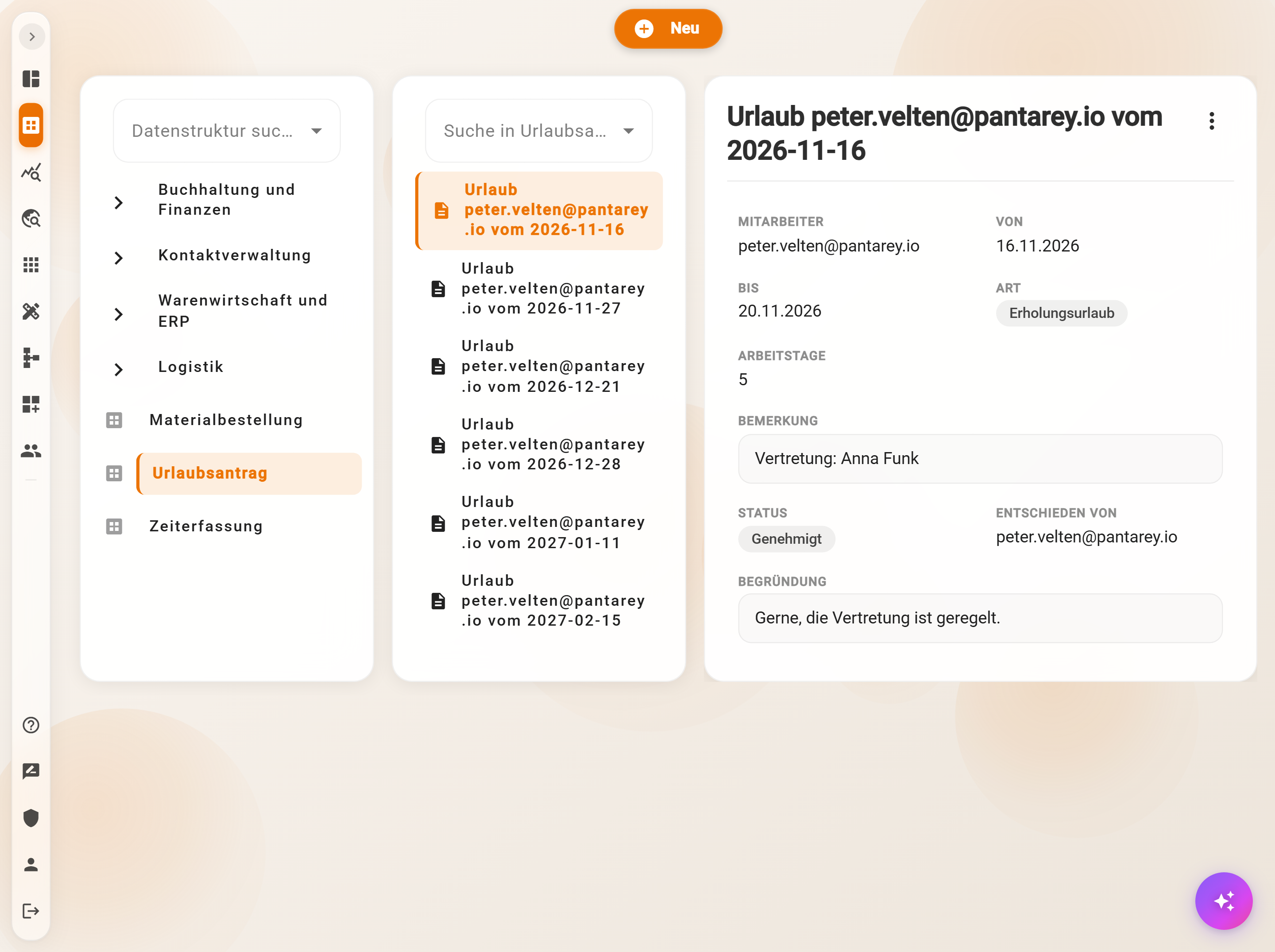
Layout
- Left: the tree of data structures, with Search data structure. Parent structures expand, a click on the name shows the records. Only structures for which the permission List exists appear.
- Middle: the records of the selected structure. If the document name contains slashes, they become folders, for instance
2026/11/Invoice 17; folders load when expanded, 500 entries per step, then Load more…. Search in … finds up to 25 matches from the first character on; if there are more, a more precise term helps. Hovering over an entry shows a preview with the preview fields. - Right: the opened record in the form of its data structure, read-only, with references as links, files for download and below them the Linked records. In the profile, Database view switches between Compact (two columns) and Comfortable (one column).
On tablets and smartphones this becomes a path in three steps: data structure, records, details, with Back.
Creating a record
New at the top opens the dialog "Create …" with the form of the data structure, exactly as the Data Designer generates it from the attributes: required fields, selection lists, references with search, computed fields that change while typing, and validation rules that report immediately when something does not fit. Create saves; the document name results from the naming rule of the data structure. Without the permission Create, the button is greyed out.
Two checks can reject saving: a document name that already exists (unless the data structure allows duplicate names), and a field marked Unique whose value is already taken. In both cases Pantarey reports "Record already exists".
Editing a record and other actions
The menu ⋮ at the top right of the record offers:
| Action | What happens | Requires |
|---|---|---|
| Edit | dialog "Change data" with the same form; Save checks as when creating | Update |
| Raw data | the record as JSON, read-only, with all system fields | Read |
| Copy | opens "Create" with all values as a template; id and document name are assigned anew | Update |
| Convert | the record moves to another data structure of the same inheritance line, see below | Update, in the target also Create |
| Share | copies a download link to the JSON file of the record, valid for one hour | Read |
| Delete | final after confirmation; if other records refer to this one, deleting is blocked | Delete |
Permissions apply per record: with a permission for certain records only, the entries are greyed out for the others. The link to the record for colleagues is the address in the browser; it contains data structure and id.
Convert
A contact turns out to be an organization, a general document is to become an invoice: Convert moves the record to a parent or child data structure of the same inheritance line. Id and incoming linked records are preserved.
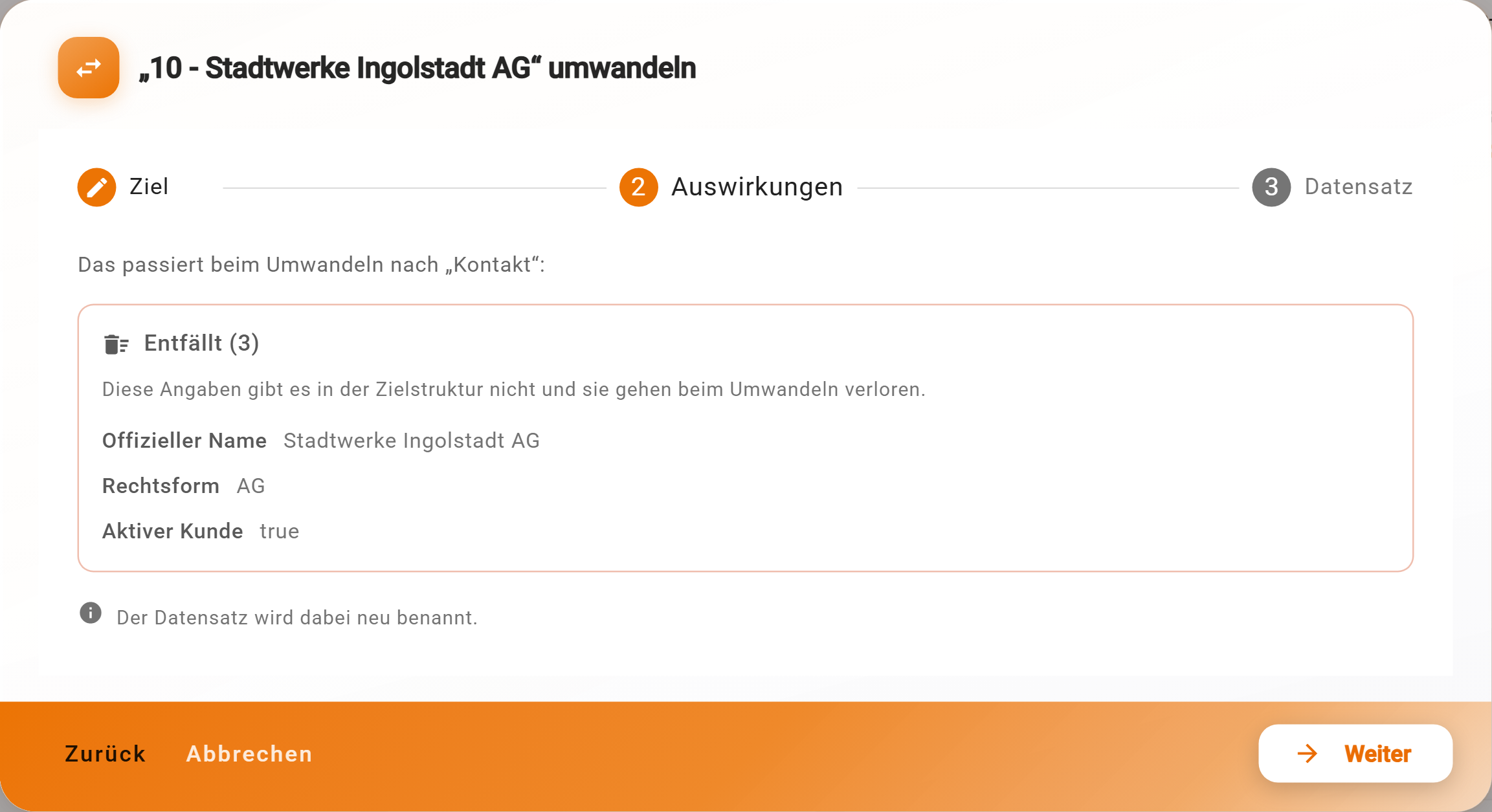
- Target: the possible data structures; blocked ones state the reason, for instance "Linked records do not allow this" or "No permission".
- Effects: Dropped lists fields with a value that do not exist in the target; Must be filled in lists the required fields of the target; the record is renamed according to the naming rule of the target.
- Record: the form of the target, prefilled with the values taken over. Convert saves.
Linked records
Below the form, Linked records shows which other records refer to this one, grouped by data structure, with a filter field: for a customer, for instance, all invoices with the field "Recipient". A click opens the referring record. Only what the person is allowed to see is shown; if there are more, a note names the administrator. The references in the other direction are in the form itself as reference fields.
As long as linked records exist, the record can neither be deleted nor converted. First change the referring records, then delete.
Opening records from other areas
Tables on dashboards, the Kanban, the planning board, the record widget and Data analytics open records in the Database with a click, as does a connected AI assistant with a link. If the permission is missing, "Missing permission" is shown there; if the id is unknown, "Record for the given ID could not be found".
Example
The accounting department of Musterfirma looks for invoice R-00002: Database → Invoice → search "R-00002". There is nothing under Linked records, in the form "Recipient" refers to Bäckerei Huber; a click opens the contact, whose linked records show all invoices to the bakery.
Frequently asked questions
A data structure is missing from the tree.
The permission List is missing for it, or a deny hides it. The administrator checks this in the Data Designer under Permissions.
\"Record already exists\" when saving.
Either the document name already exists, or a field marked Unique already has the value. Change the value or switch on Allow duplicate document names in the Data Designer, then Pantarey appends (1), (2).
Can records be exported as Excel?
Not from the Database. Data analytics exports every query as CSV, Excel or JSON; in the Data Designer, Export data saves all records of a structure as a JSON backup.
Why is \"Delete\" greyed out?
The permission Delete is missing for this record, or other records refer to it. References are listed under Linked records.
Is there a history of changes?
The record knows "Modified by" and "Modified on" in the raw data, but no versions. Whoever needs to trace changes runs them through a process whose instances are in the Process Explorer.
Next step
Create a new data structure: where form, folders and document name come from.