Validation rules
Required, type and value list are checked by each field on its own. What concerns several fields together is checked by validation rules in the Validation tab: the end lies after the start, the discount does not exceed the amount, a rejected decision has a reason. A rule counts as fulfilled when its expression is true; otherwise Pantarey rejects the save, with the message that is stored here.
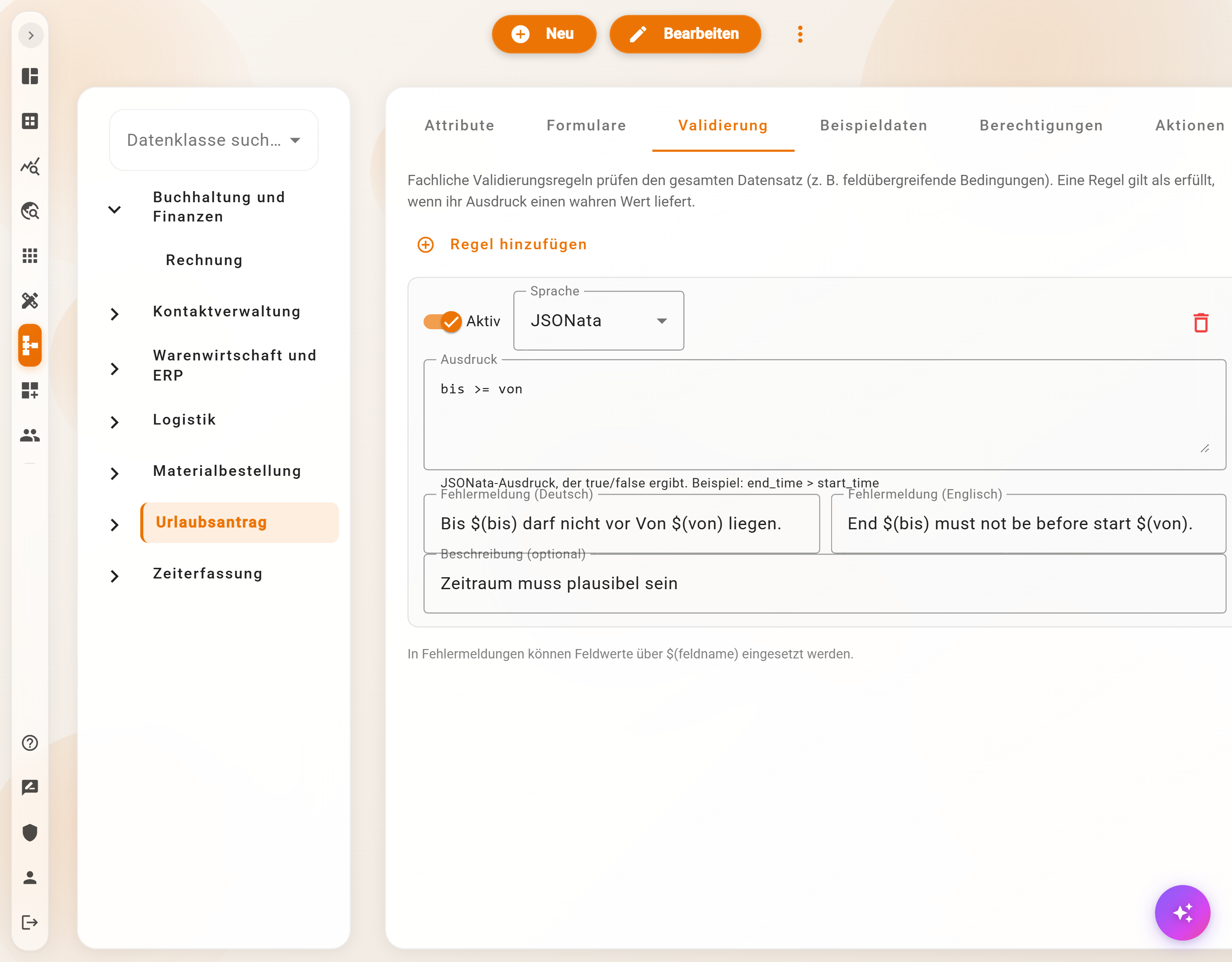
Creating a rule
- Open the schema in the Data Designer, Validation tab, Add rule.
- Language: JSONata or JavaScript.
- Expression that evaluates to true or false. JSONata for example
bis >= von; JavaScript as a function body withreturn, for examplereturn $.betrag > 0;with$,objandrootas the record. - Error message (German) and Error message (English). Field values are inserted with
$(fieldname): "Bis $(bis) darf nicht vor Von $(von) liegen." - Optionally a Description as an internal note. The tab saves changes by itself.
The Active / Inactive switch disables a rule without deleting it; the trash icon removes it.
Where checks run
| Where | When | What happens |
|---|---|---|
| Database, "create" and "Edit data" dialogs | JSONata rules on every input, all rules on save | Banner "Please check your input" with the messages; save locked |
| Start form of a process | on every input on the server | Start locked as long as a rule is violated |
| User task in the process | when writing via the Database element | the step fails with the message |
| Processes, imports, AI assistants | on save | Rejection with the messages |
The rules therefore apply equally everywhere; no record that violates them gets through anywhere. Computed fields and fallback values are already set at check time and may appear in rules.
Guarding empty fields
A JSONata expression over an empty field returns no result. Live in the form this is skipped; on save it counts as a failure of the rule and the save fails. Empty fields should therefore be allowed explicitly:
$not($exists(ende)) or ende >= beginn
status != 'abgelehnt' or $length($trim(begruendung)) > 0
rabatt = null or rabatt <= betrag
Examples
| Rule | JSONata | Message |
|---|---|---|
| Period is valid | bis >= von |
Bis $(bis) darf nicht vor Von $(von) liegen. |
| Give a reason for rejection | status != 'abgelehnt' or $exists(begruendung) |
Eine Ablehnung braucht eine Begründung. |
| Sum of line items | $count(positionen) > 0 |
Mindestens eine Position angeben. |
| Due date after invoice date | faellig_am >= rechnungsdatum |
Fällig am $(faellig_am) liegt vor dem Rechnungsdatum. |
| At most 30 days | $fn('date_workdays', von, bis) <= 30 |
Mehr als 30 Arbeitstage am Stück sind nicht vorgesehen. |
With the AI assistant
A connected assistant creates validation rules in developer mode and must provide test records for this that are meant to pass and to violate the rule; this way a rule is never saved blindly. It can also check a record without saving it and then reports the violated rules.
Example
The leave request of Musterfirma gets the rule
bis >= vonwith the message "Bis $(bis) darf nicht vor Von $(von) liegen." Whoever enters 20 March as Von and 18 March as Bis in the start form sees the message immediately below the form; the process only starts once the data is correct.
Frequently asked questions
The rule reports nothing in the form, but the save fails.
JavaScript rules only run on the server. For a live message, write the rule in JSONata.
Old records violate a new rule.
They remain stored and readable. The rule takes effect on the next edit. Update entries in the Actions tab saves all of them again and aborts on violations; clean up the data beforehand.
Does the rule also apply to derived schemas?
No, every schema has its own rules. For shared rules, create the rule in every derived schema.
Next step
Forms: what the automatic form can do and which special fields custom forms have.